What Actually Happens in coalesce()🔗
coalesce(n) is a narrow transformation, but that does not mean zero data movement.
It means:
- No full shuffle across all partitions
- But some data may still be reassigned/moved
How Coalesce Reduces Partitions🔗
Spark:
- Selects a subset of existing partitions as targets
- Maps multiple old partitions → fewer new partitions
- Avoids re-hashing / global redistribution
Example🔗
Before (4 partitions across executors)🔗
After coalesce(2)🔗
Possible mapping:
Does Data Move?🔗
Case 1: Ideal (Same Executor)🔗
If:
- P1 and P2 are already on same executor
Then:
- Minimal or no data movement
Case 2: Different Executors🔗
If:
- P1 is on Executor 1
- P2 is on Executor 2
Then:
- One partition’s data must move to the other executor
Key Insight🔗
coalesce()avoids global shuffle, but does not guarantee data locality
- It does not rebalance data evenly
- It just collapses partitions with minimal coordination
Why It’s Still Faster Than repartition()🔗
coalesce()🔗
- Moves only necessary partitions
- No re-hashing
- No all-to-all communication
repartition()🔗
- Every partition sends data to every other partition
- Full network shuffle
Internal Behavior (Important)🔗
- Uses a Partition Coalescer
- Groups partitions into fewer buckets
-
Tries to:
-
Prefer data locality
- Minimize cross-node transfer
But:
- No strict guarantee
Visual Comparison🔗
coalesce(2)🔗
(Limited movement)
repartition(2)🔗
(All-to-all shuffle)
Final Answer🔗
coalesce()does not strictly merge partitions within the same executor. It may move data across executors, but only as needed, avoiding a full shuffle and minimizing network I/O.
Interview One-Liner🔗
coalesce()minimizes data movement but does not eliminate it; it can move data across executors, just without triggering a full shuffle likerepartition().
Here’s a real-world case study that clearly shows how coalesce() behaves (including data movement) and why it’s chosen over repartition() in practice.
Case Study: Databricks ETL Pipeline (Event Logs → Delta Lake)🔗
Scenario🔗
You’re a Data Engineer processing clickstream / event data:
- Source: Kafka → Bronze table (raw JSON)
- Processing: Spark (Databricks)
- Output: Delta table in S3 / ADLS
- Volume: ~500 GB/day
- Initial partitions: 2000 partitions
Step 1: Raw Data Load🔗
After ingestion:
Why so many partitions?
- Auto Loader / Kafka ingestion
- Small micro-batches
- High parallelism
Step 2: Transform + Filter🔗
Now:
- Data volume drops to ~50 GB
- But partitions are still 2000
Problem🔗
If you write directly:
You get:
- 2000 small files
- Poor query performance
- Metadata overhead
- Slow downstream reads
Step 3: Optimize with coalesce()🔗
What Actually Happens Internally🔗
Before🔗
Coalesce Mapping (Example)🔗
Important: Does Data Move?🔗
Yes — but selectively🔗
Case A: Same Executor🔗
If P1–P20 are on same executor:
- No network movement
- Just merged locally
Case B: Different Executors🔗
If partitions are spread:
- Some partitions must move across executors
-
But:
-
No full shuffle
- No all-to-all exchange
Why Not Use repartition(100)?🔗
This would:
- Trigger full shuffle
- Every partition sends data everywhere
- Massive network I/O for 50 GB
Performance Comparison (Realistic)🔗
| Operation | Shuffle | Time | Network |
|---|---|---|---|
| No change (2000 files) | None | Fast write, slow reads | Low |
coalesce(100) |
Minimal | Fast | Low |
repartition(100) |
Full | Slow | High |
Step 4: Write Optimized Output🔗
Result:
- ~100 files (~500 MB each)
-
Much better for:
-
Query performance
- File pruning
- Metadata handling
Where This Matters in Real Systems🔗
1. Delta Lake Optimization🔗
In platforms like Databricks:
- Small file problem is very common
coalesce()is frequently used before writes
2. Daily Batch Pipelines🔗
Typical pattern:
3. Cost Optimization🔗
- Less shuffle → less compute time
- Less network → lower cloud cost
- Fewer files → faster queries
When This Strategy Fails🔗
Skewed Data Example🔗
If:
Then:
coalesce()may create uneven partitions- One task becomes a bottleneck
In such cases:
is better
Key Takeaways🔗
1. coalesce() in real life🔗
- Used to reduce output files
- Common before writes
2. Data Movement Reality🔗
It can move data across executors, but avoids full shuffle
3. Why Engineers Prefer It🔗
- Faster than repartition
- Good enough distribution for writes
- Minimizes shuffle cost
Let’s build a clean, first-principles understanding of skew, partitions, tasks, and how Spark actually executes work—the way you should think about it in interviews and real systems.
1. Fundamental Building Blocks🔗
Partition🔗
- A logical chunk of data
- Smallest unit Spark can process independently
Task🔗
- A unit of computation on one partition
1 partition → 1 task
Executor🔗
- A JVM process with CPU + memory
- Runs multiple tasks (based on available cores)
2. How Spark Actually Executes a Job🔗
Suppose you have:
Total parallel capacity:🔗
Execution:🔗
- Spark launches 20 tasks in parallel
- Remaining tasks wait in queue
3. Where Skew Comes From🔗
Ideal Case (Balanced)🔗
All tasks:
- Start together
- Finish roughly together
Cluster utilization = high
Skewed Case (Problem)🔗
Execution:
Task 1 → 10MB → finishes fast
Task 2 → 10MB → finishes
Task 3 → 10MB → finishes
Task 4 → 500MB → runs long
Now:
- 3 executors become idle
- Only 1 executor is busy
This is called a straggler task
4. Why Spark Cannot Fix This Automatically🔗
Because:
- Each partition is independent
- A task cannot be split across executors
- Spark cannot “steal” work from a running task
So one big partition = one long-running task
5. Where Skew Happens Most Often🔗
5.1 Joins (Most common)🔗
Spark:
- Shuffles data by
user_id - Same keys go to same partition
Problem:🔗
→ One partition becomes huge
5.2 Aggregations🔗
If:
→ One partition gets overloaded
5.3 Repartition by key🔗
Same issue if key distribution is uneven
6. How Shuffle Creates Skew🔗
During shuffle:
- Data is redistributed based on key
- Hash function assigns key → partition
If one key is frequent:
→ That partition gets most of the data
7. Diagnosing Skew🔗
In Spark UI:
- One task takes much longer than others
-
Large difference in:
-
Input size
- Shuffle read size
- Duration
This is a clear sign of skew
8. Solutions (Deep Understanding)🔗
8.1 Repartition (General balancing)🔗
- Full shuffle
- Redistributes rows more evenly
But:
- Does NOT fix skew caused by a single heavy key
8.2 Salting (Best for key skew)🔗
Idea:
Break one heavy key into multiple smaller keys
Example:🔗
Instead of:
Make:
Code:
from pyspark.sql.functions import col, rand

df = df.withColumn("salt", (rand()*10).cast("int"))
df = df.withColumn("user_id_salted", concat(col("user_id"), col("salt")))
Now:
- Data spreads across partitions
- No single partition is overloaded
8.3 Broadcast Join (Best when one table is small)🔗
- No shuffle on large dataset
- Eliminates skew entirely
8.4 Skew Join Optimization (Spark 3+)🔗
Spark can automatically:
- Detect skewed partitions
- Split large partitions
Config:
spark.conf.set("spark.sql.adaptive.enabled", "true")
spark.conf.set("spark.sql.adaptive.skewJoin.enabled", "true")
8.5 Coalesce (Not for skew)🔗
- Reduces partitions
- No full shuffle
- Does NOT rebalance data
9. Repartition vs Coalesce (Final Clarity)🔗
| Feature | Repartition | Coalesce |
|---|---|---|
| Shuffle | Yes | No (mostly) |
| Balancing | Yes | No |
| Increase partitions | Yes | No |
| Decrease partitions | Yes | Yes |
| Fix skew | Partial | No |
10. Final Mental Model🔗
Think like this:
- Spark = parallel system
- Parallelism depends on number of partitions
- Efficiency depends on balanced partitions
The goal is not just “more partitions” but evenly sized partitions
11. One-Line Summary🔗
Skew occurs when one or few partitions contain disproportionately large data, causing long-running tasks (stragglers) and underutilized executors, and it must be handled using techniques like repartitioning, salting, broadcast joins, or adaptive execution.
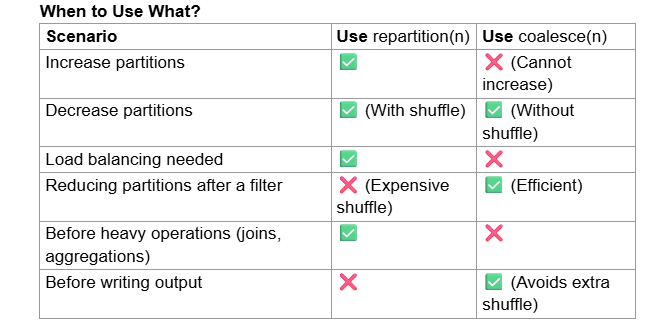
Example Use Cases
Repartition for Large Joins:
Ensures both datasets have balanced partitions before joining. Coalesce Before Writing to Disk:
Reduces shuffle and writes fewer output files.
Repartitioning by column name🔗
When you use .repartition(column_name), Spark redistributes the data based on the values in the specified column. This helps when working with data that needs to be grouped by a specific column before performing operations like joins or aggregations.
Syntax:
- This will shuffle data so that all rows with the same category value end up in the same partition.
- The number of partitions will be decided by Spark's default settings (typically based on cluster size and data volume).
Repartition with Both Column & Number of Partitions
You can also specify both a column name and a number of partitions: df.repartition(10, "category") # Redistributes by 'category' into 10 partitions
Spark will first hash partition the data based on category values. Then, it will further distribute the data into 10 partitions.
This ensures a controlled number of partitions while still grouping data by column.