SSE-KMS Encryption in Amazon S3🔗
SSE-KMS (Server-Side Encryption with KMS keys) is a server-side encryption method where Amazon S3 encrypts your data using encryption keys stored in AWS Key Management Service.
Unlike SSE-S3, the encryption keys are managed and controlled through KMS, which gives you auditing, access control, and key management capabilities.
1. How SSE-KMS Works🔗
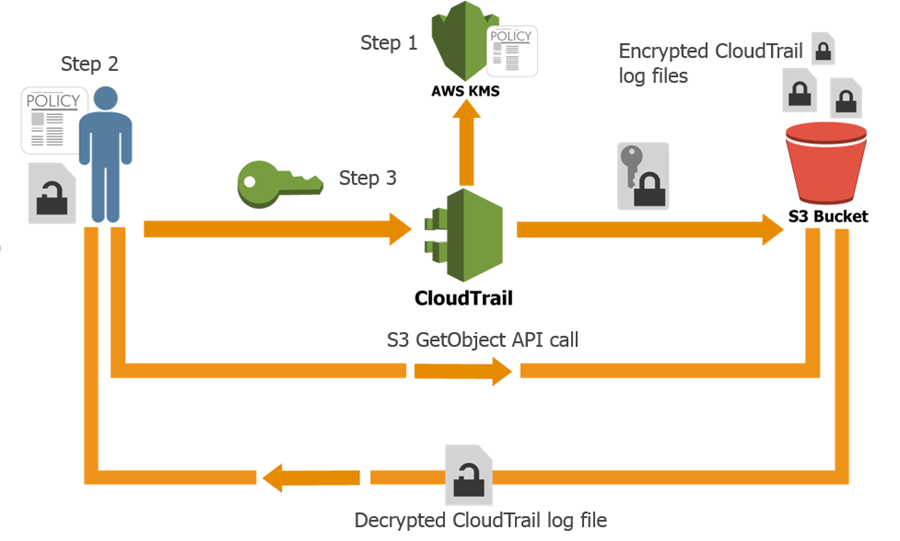


Encryption process:
- Client uploads object to S3
- S3 sends request to KMS to generate a data encryption key
-
KMS returns:
-
plaintext data key
- encrypted data key
- S3 encrypts the object using the plaintext key
- Encrypted object + encrypted key are stored together
When retrieving:
- S3 sends encrypted key to KMS
- KMS decrypts it
- S3 decrypts the object and returns it
This approach is called Envelope Encryption.
2. Envelope Encryption Concept🔗
Two keys are involved:
| Key Type | Purpose |
|---|---|
| Data Key | Encrypts the actual object |
| KMS Key (CMK) | Encrypts the data key |
Flow:
This improves security and performance.
3. Types of KMS Keys🔗
Keys used in SSE-KMS are managed in AWS Key Management Service.
AWS Managed Key🔗
Automatically created by AWS.
Example:
Pros:
- Easy to use
- No management
Customer Managed Key (CMK)🔗
Created by you.
Advantages:
- Control permissions
- Enable key rotation
- Audit usage
- Disable keys if needed
Most enterprises use customer managed keys.
4. Enabling SSE-KMS in S3🔗
Method 1 — Default Bucket Encryption🔗
Steps:
- Open S3 console
- Select bucket
- Go to Properties
- Default encryption
- Choose SSE-KMS
- Select KMS key
Now all new objects will be encrypted.
Method 2 — During Upload🔗
CLI example:
Method 3 — API Header🔗
5. Permissions Required for SSE-KMS🔗
When using SSE-KMS, users need both S3 and KMS permissions.
Example IAM policy:
And KMS permissions:
{
 "Effect": "Allow",
 "Action": [
   "kms:Encrypt",
   "kms:Decrypt",
   "kms:GenerateDataKey"
 ],
 "Resource": "arn:aws:kms:region:account-id:key/key-id"
}
Without KMS permissions → AccessDenied error.
6. SSE-S3 vs SSE-KMS🔗
| Feature | SSE-S3 | SSE-KMS |
|---|---|---|
| Key management | AWS | KMS |
| Audit logging | No | Yes |
| Key rotation | No | Yes |
| Access control | Limited | Fine-grained |
| Cost | Free | KMS charges |
SSE-KMS is used in security-sensitive environments.
7. Example Data Engineering Pipeline🔗
Example pipeline:
Services involved:
- Amazon Kinesis
- AWS Lambda
- Amazon Athena
If the S3 bucket uses SSE-KMS:
- Lambda uploads object
- S3 calls KMS
- Object stored encrypted
- Athena decrypts automatically when reading
8. SSE-KMS Advantages🔗
✔ Fine-grained key control ✔ Audit logs via AWS CloudTrail ✔ Key rotation ✔ Ability to disable keys instantly ✔ Access control at key level
9. Common Interview Scenario🔗
Question
Lambda uploads to an SSE-KMS encrypted S3 bucket but gets:
Why?
Possible reasons:
- Lambda role missing kms:Encrypt
- Lambda role missing kms:GenerateDataKey
- KMS key policy blocks the role
✅ Interview Answer (Short)
SSE-KMS is a server-side encryption method where Amazon S3 encrypts objects using data keys generated by AWS KMS. The data key encrypts the object, and the KMS key encrypts the data key using envelope encryption. It provides better security, auditing, and access control compared to SSE-S3.
Here is a realistic data engineering case study showing how encryption works when storing and retrieving data from Amazon S3 using AWS Key Management Service.
This type of architecture is common in financial services companies (similar to the environment you might see at StoneX).
Case Study: Secure Financial Transaction Data Lake🔗
1. Business Problem🔗
A financial company processes millions of trading transactions daily.
Requirements:
- Encrypt sensitive financial data
- Restrict access to authorized services
- Maintain audit logs
- Allow analytics teams to query data
The company builds a pipeline using:
- Amazon Kinesis
- AWS Lambda
- Amazon S3
- Amazon Athena
- AWS Key Management Service
2. Architecture🔗


Pipeline flow:
Trading Systems
      ↓
Kinesis Stream
      ↓
Lambda Processing
      ↓
Encrypted S3 Bucket (SSE-KMS)
      ↓
Athena Queries
3. Step 1 — Create KMS Key🔗
Create a customer managed key in AWS Key Management Service.
Example key alias:
Key policy allows:
- Lambda role
- Athena role
- Data engineers
4. Step 2 — Enable Encryption on S3 Bucket🔗
Enable default SSE-KMS encryption.
Bucket configuration:
Now every object uploaded is automatically encrypted.
5. Step 3 — Lambda Writes Encrypted Data🔗
Lambda processes streaming events from Amazon Kinesis.
Example Python code:
import boto3
import json

s3 = boto3.client("s3")

def lambda_handler(event, context):

    data = {
        "trade_id": 101,
        "symbol": "AAPL",
        "price": 182
    }

    s3.put_object(
        Bucket="trading-data-lake",
        Key="trades/trade1.json",
        Body=json.dumps(data),
        ServerSideEncryption="aws:kms",
        SSEKMSKeyId="alias/trading-data-key"
    )
When this runs:
- S3 requests data key from KMS
- Object encrypted using data key
- Data key encrypted using KMS key
This is envelope encryption.
6. Step 4 — Stored Object in S3🔗
Stored object contains:
Example metadata:
7. Step 5 — Retrieving Data🔗
Analytics team runs query using Amazon Athena.
Example query:
Retrieval process:
- Athena requests object from S3
- S3 sends encrypted data key to KMS
- KMS decrypts data key
- S3 decrypts object
- Athena receives plaintext data
User never sees encryption keys.
8. Security Controls Implemented🔗
1 Bucket Policy Enforcing Encryption🔗
{
 "Effect": "Deny",
 "Principal": "*",
 "Action": "s3:PutObject",
 "Resource": "arn:aws:s3:::trading-data-lake/*",
 "Condition": {
   "StringNotEquals": {
     "s3:x-amz-server-side-encryption": "aws:kms"
   }
 }
}
Objects must use SSE-KMS.
2 KMS Key Permissions🔗
Only allowed services:
- Lambda
- Athena
- Data engineers
3 Audit Logs🔗
Encryption usage logged in:
AWS CloudTrail.
Example log event:
This helps detect unauthorized access attempts.
9. Real Benefits🔗
This architecture provides:
✔ Encryption at rest ✔ Fine-grained access control ✔ Key rotation ✔ Auditability ✔ Compliance (SOC2 / PCI / GDPR)
10. Real Interview Answer🔗
If asked:
“How would you secure sensitive data in S3?”
Good answer:
I would enable SSE-KMS encryption on the S3 bucket using a customer managed key in AWS KMS. Services like Lambda would use IAM roles with permissions to generate and decrypt data keys. S3 would encrypt objects using envelope encryption, and when services like Athena retrieve data, S3 automatically decrypts it using KMS.