Airflow Job & Task Lifecycle (Deep, Internals-Oriented)🔗
In Apache Airflow🔗
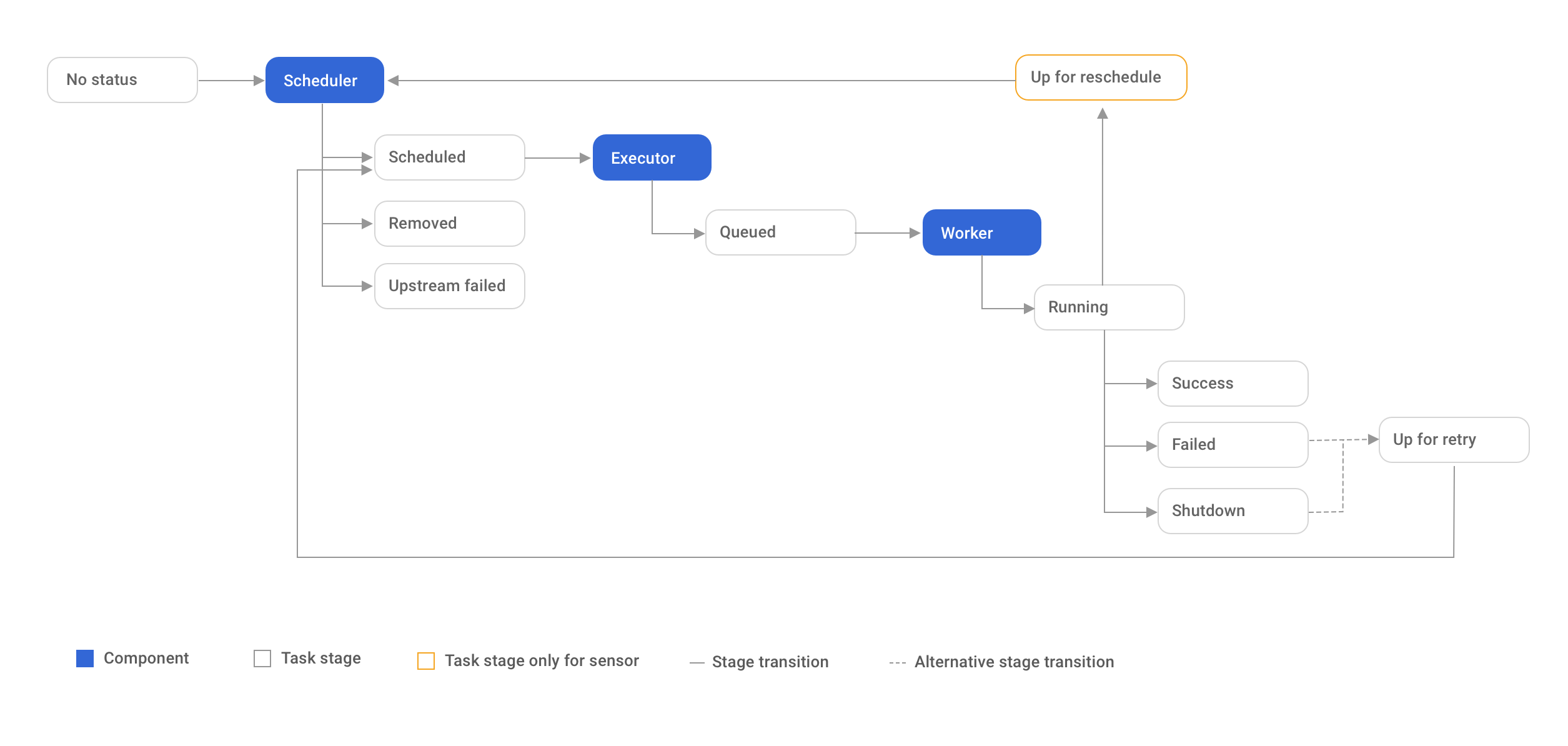
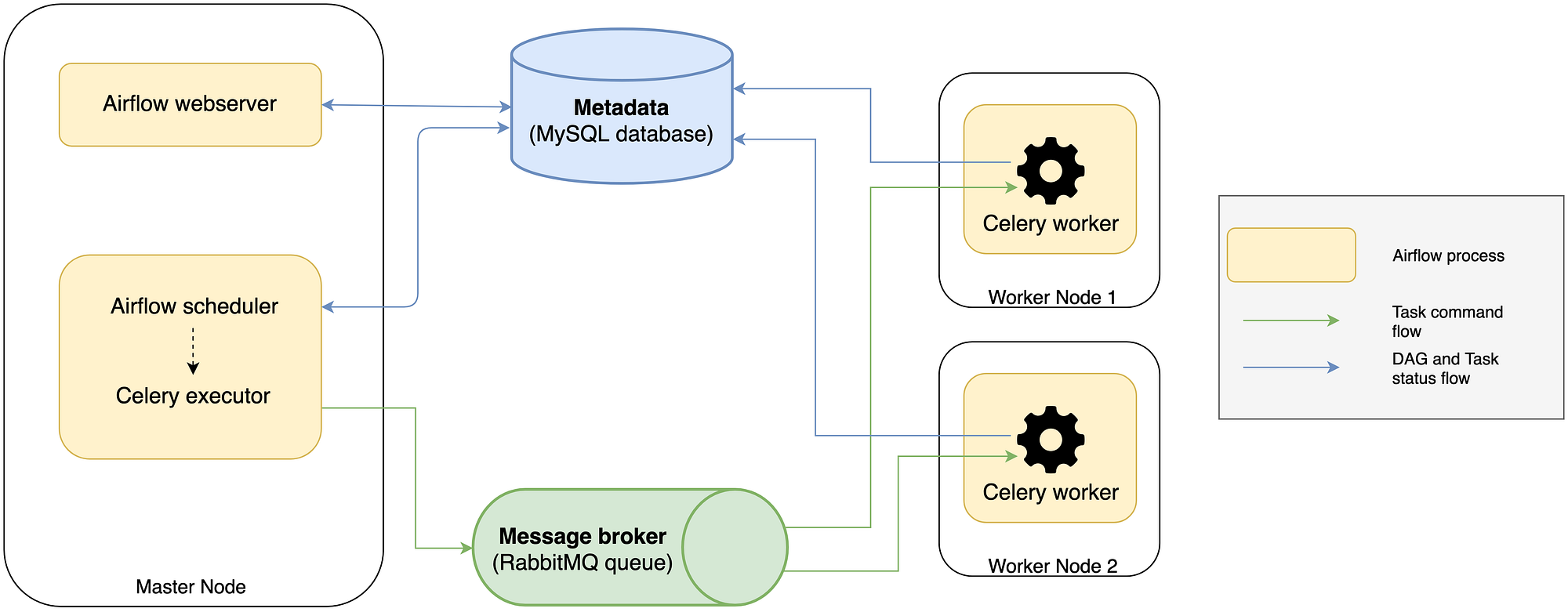
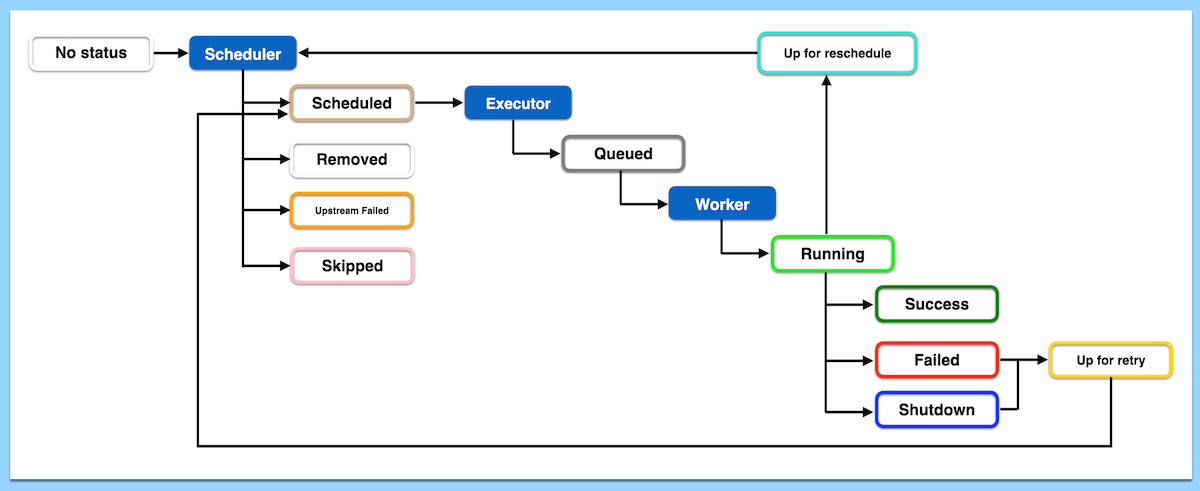
This explanation follows what actually happens in the metadata database and scheduler, not just the UI view.
1) What is a “Job” in Airflow?🔗
In Airflow terminology:
- Job (informal) → a DAG Run
- Task execution → a Task Instance
So when people say “Airflow job”, they usually mean:
One execution of a DAG for a specific logical date
2) DAG Run Lifecycle (End-to-End)🔗
A DAG Run represents one logical execution window.
Step 1: Scheduler decides a DAG run is needed🔗
Scheduler checks:
start_dateschedule_intervalcatchupis_paused
Metadata DB impact🔗
- Inserts a row into
dag_run
Initial state:
Important:
- This is logical time, not wall-clock time
- A DAG run for
2025-01-01may run on2025-01-02
Step 2: Scheduler creates Task Instances🔗
For each task in the DAG:
- Scheduler creates a row in
task_instance
Initial state:
Nothing has executed yet.
3) Task Instance Lifecycle (Very Detailed)🔗
This is the most important part to understand.
TaskInstance States (Core)🔗
Each transition is persisted to the metadata DB.
Step 1: Dependency Resolution🔗
Scheduler evaluates whether a task can run:
Checks include:
- Upstream task states
- Trigger rules
- Pools
- Concurrency limits
depends_on_past- Sensors
If all conditions pass:
Metadata DB🔗
Step 2: Queuing🔗
Scheduler hands off the task to the executor.
Metadata DB🔗
At this point:
- Task is eligible for execution
- Not yet running
- Waiting for a worker slot
Step 3: Execution Begins (Worker Side)🔗
Executor assigns the task to a worker.
Worker:
- Forks a process
- Loads DAG code
- Instantiates the operator
- Calls
operator.execute()
Metadata DB🔗
This is when:
- Logs start streaming
- Retries counter is incremented
Step 4a: Successful Completion🔗
Operator finishes without exception.
Metadata DB🔗
Scheduler now evaluates downstream tasks.
Step 4b: Failure Path🔗
If an exception is raised:
Metadata DB🔗
Scheduler decides next step based on retry policy.
Step 5: Retry Logic🔗
If retries are configured:
Metadata DB🔗
After retry_delay:
- Task goes back to
SCHEDULED - Entire lifecycle repeats
Retries are state transitions, not new rows.
4) DAG Run Completion Logic🔗
Scheduler continuously checks:
- Are all task instances in terminal states?
Terminal states:
If all tasks succeed🔗
If any critical task fails🔗
5) Clearing Tasks (Why It Works)🔗
When you clear a task in UI:
task_instance.stateis reset toNONE- Same DAG run
- Same logical date
Airflow replays the lifecycle without creating a new DAG run.
This is why partial reprocessing is cheap and safe.
6) Backfills (Special Case)🔗
Backfill:
- Inserts multiple rows into
dag_run - Each DAG run has its own task instances
- Scheduler treats them as independent runs
Key insight:
Backfills are just normal DAG runs created retroactively
7) Failure Scenarios (Real Internals)🔗
Worker Crash🔗
- Task remains
RUNNING - Scheduler eventually marks it
FAILED - Retry logic kicks in
Scheduler Restart🔗
- Scheduler reloads state from metadata DB
- No task state is lost
Metadata DB Slow🔗
- Tasks stay
QUEUED - DAG appears “stuck”
- No scheduling progress
8) Why Task Granularity Matters🔗
One large task:
- Large blast radius
- Expensive retries
Multiple small tasks:
- Fine-grained recovery
- Faster reruns
- Better observability
This is a metadata DB design advantage, not just a coding style.
9) Mental Model (Critical)🔗
Think of lifecycle like this:
DAG Run  = orchestration instance (time window)
Task     = logical step
TaskInstance = execution record
State changes = rows updated in metadata DB
Airflow is state-machine driven, not event-driven.
One-Line Summary🔗
A DAG run is created first, task instances are materialized next, and every scheduling, retry, failure, and success is driven entirely by state transitions stored in the metadata database.