Airflow Architecture - Metadata DB
Airflow Architecture Deep Dive🔗
Metadata Database (Very Important Component)🔗
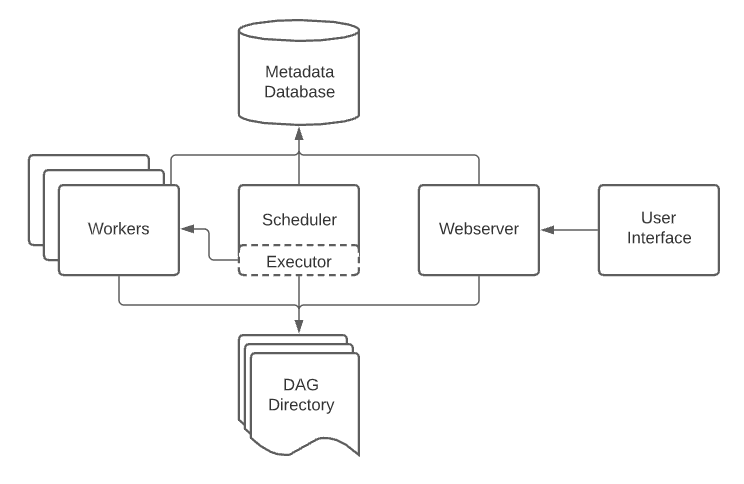
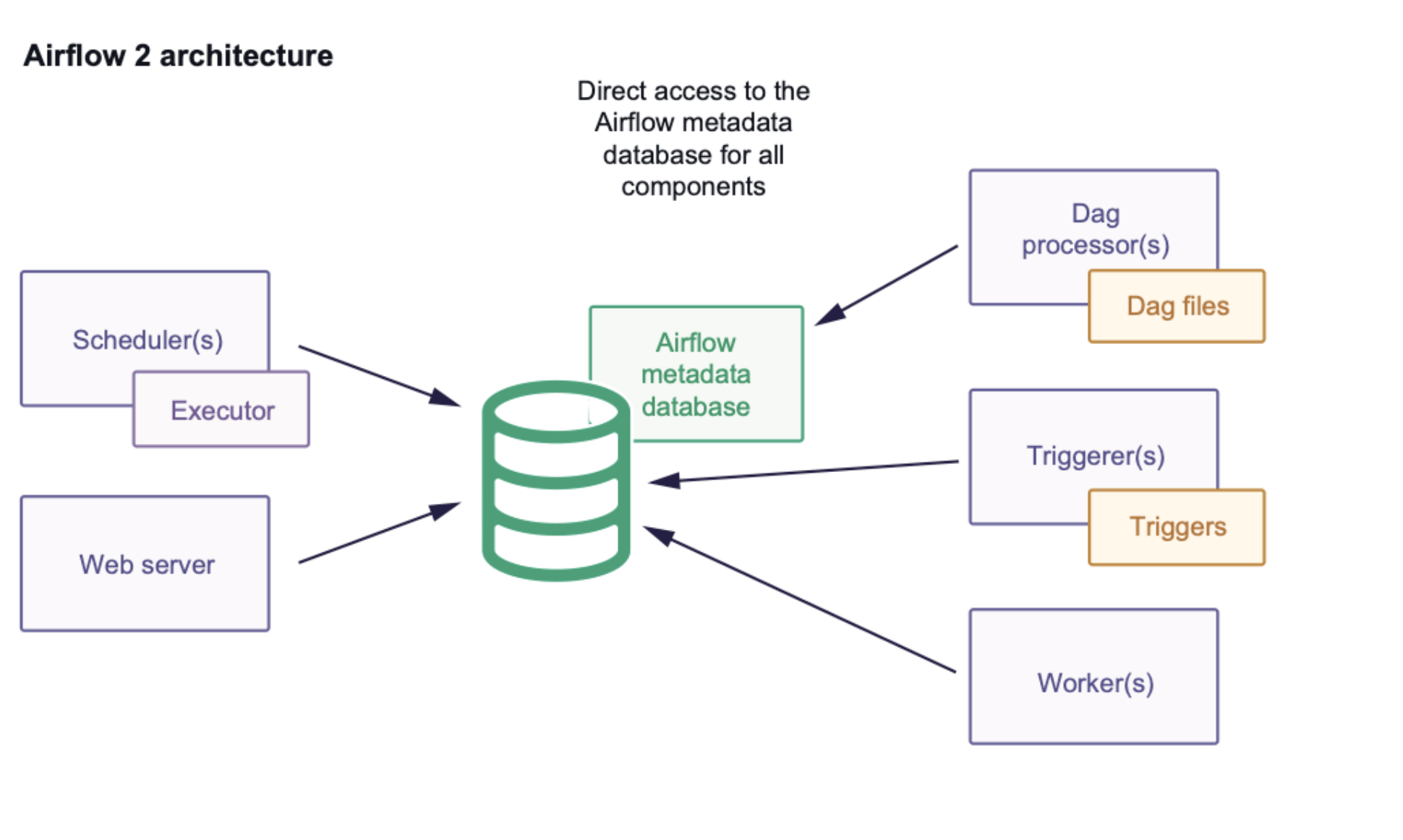
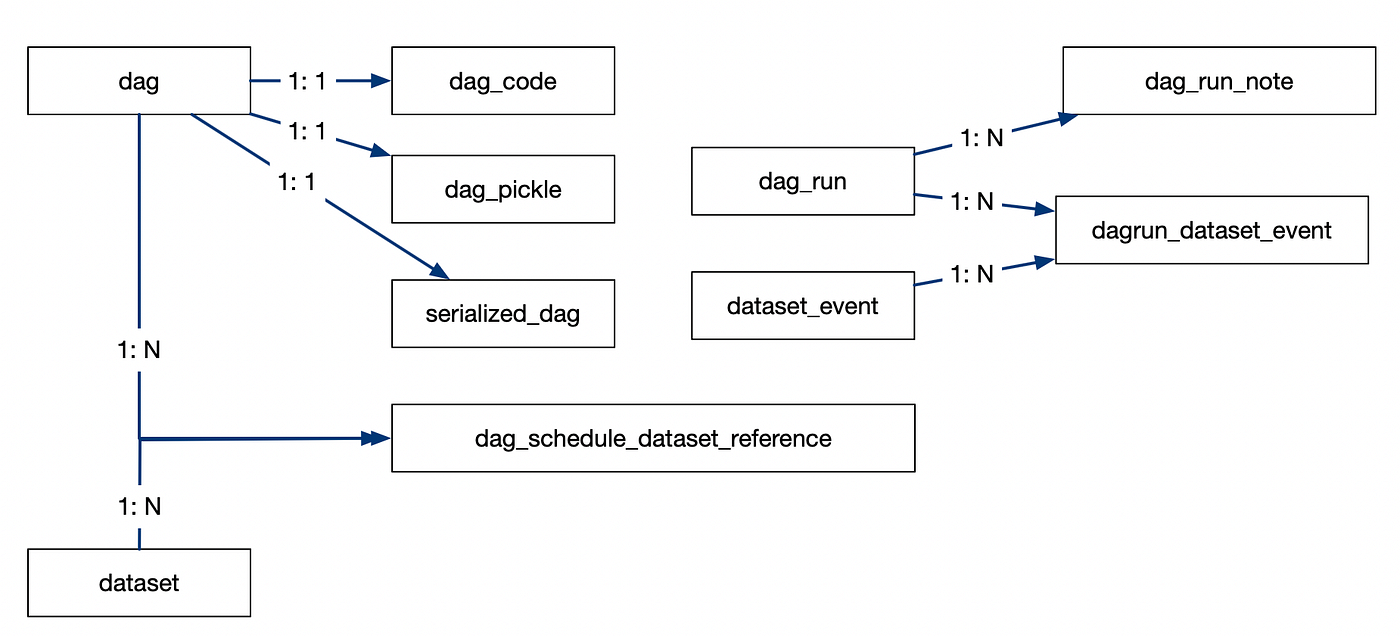
In Apache Airflow, the Metadata Database is the single source of truth. If you truly understand this database, you understand how Airflow actually works.
1) What is the Metadata Database?🔗
The metadata database is a relational database (PostgreSQL or MySQL in production) that stores:
- DAG definitions (state, schedule, pause status)
- DAG runs (logical dates, run status)
- Task instances (success, failed, retries)
- Scheduling decisions
- XComs (inter-task communication)
- Connections, Variables, Pools
- SLA misses, logs metadata
Airflow does not store state in memory. Everything important is persisted here.
2) Why Metadata DB is Central to Airflow🔗
Airflow is stateless at the process level:
- Scheduler can restart
- Webserver can restart
- Workers can die
But the metadata DB preserves reality.
If the DB is lost or corrupted:
- Airflow forgets what ran
- Backfills break
- Task retries become incorrect
3) Core Tables (Conceptual Model)🔗
Below are the most important tables you must understand.
3.1 dag Table🔗
Stores DAG-level metadata.
| Column | Meaning |
|---|---|
dag_id |
DAG name |
is_paused |
Whether DAG is paused |
is_active |
Loaded by scheduler |
last_parsed_time |
DAG parse timestamp |
owners |
DAG owners |
Purpose:
- Controls whether a DAG is eligible for scheduling
3.2 dag_run Table🔗
Each logical execution of a DAG.
| Column | Meaning |
|---|---|
dag_id |
DAG name |
run_id |
Unique run identifier |
execution_date |
Logical date |
state |
running / success / failed |
start_date |
Actual start time |
end_date |
Completion time |
Key insight:
- Airflow schedules by logical time, not wall-clock time
3.3 task_instance Table (MOST IMPORTANT)🔗
This table represents execution reality.
| Column | Meaning |
|---|---|
dag_id |
DAG name |
task_id |
Task name |
execution_date |
Logical date |
state |
success / failed / retry |
try_number |
Attempt count |
start_date |
When execution started |
end_date |
When execution ended |
hostname |
Worker host |
Every retry = new row update.
If you want to debug:
- Why task retried
- Why dependency failed
- Why DAG is stuck
You inspect this table.
3.4 task_fail🔗
Stores failure metadata.
- Exception info
- Task failure timestamps
- Retry eligibility
Used for:
- Alerting
- SLA failures
- Debugging flaky tasks
3.5 xcom🔗
Used for inter-task communication.
| Column | Meaning |
|---|---|
dag_id |
DAG |
task_id |
Task |
key |
XCom key |
value |
Serialized payload |
Key rule:
- XComs are not for large data
- Stored in metadata DB
- Large XComs cause DB bloat
3.6 slot_pool🔗
Controls concurrency limits.
| Column | Meaning |
|---|---|
pool |
Pool name |
slots |
Max parallel tasks |
used_slots |
Currently used |
Used to:
- Protect downstream systems
- Control blast radius
3.7 connection and variable🔗
Runtime configuration storage.
connection: credentials, endpointsvariable: flags, parameters
Stored encrypted at rest (optional).
4) How Scheduler Uses Metadata DB (Step-by-Step)🔗
This is critical.
Step 1: DAG Parsing🔗
- Scheduler parses DAG files
- Writes DAG metadata to
dag
Step 2: Create DAG Runs🔗
-
Scheduler checks:
-
schedule interval
start_datecatchup- Inserts rows into
dag_run
Step 3: Create Task Instances🔗
-
For each DAG run:
-
Scheduler creates rows in
task_instance - Initial state =
none
Step 4: Dependency Resolution🔗
Scheduler queries:
task_instance.state- Upstream task states
- Pools, concurrency limits
- Sensors
Only then does it queue tasks.
Step 5: Executor & Workers🔗
- Executor pulls queued tasks
-
Workers update:
-
start_date
- state
- end_date
Everything is persisted back to metadata DB.
5) Why Metadata DB Becomes a Bottleneck🔗
Common enterprise issues:
High Write Volume🔗
- Millions of task instances/day
- Frequent state updates
Slow Queries🔗
- Scheduler constantly queries
task_instance - Missing indexes = scheduler lag
XCom Abuse🔗
- Large payloads stored
- DB grows rapidly
6) Production Best Practices🔗
Database Choice🔗
- PostgreSQL recommended
- Avoid SQLite except local dev
Performance Tuning🔗
- Enable proper indexing
- Archive old task instances
- Clean XComs periodically
High Availability🔗
- Use managed Postgres
- Enable backups
- Monitor DB latency
7) Failure Scenarios (Real World)🔗
DB Down🔗
- Scheduler stops scheduling
- Running tasks may finish
- No state updates recorded
DB Lagging🔗
- DAGs appear “stuck”
- Tasks remain queued
- UI becomes inconsistent
8) Mental Model (Very Important)🔗
Think of Airflow as:
Scheduler = Decision Maker
Executor  = Task Dispatcher
Workers   = Task Runners
Metadata DB = Brain & Memory
All components read from and write to the metadata database.
One-Line Summary🔗
The metadata database is Airflow’s brain: every DAG run, task state, retry, dependency, and scheduling decision lives there.